Register with ComReg
In the Republic of Ireland, alphanumeric sender IDs (the name that appears in place of a phone number when a text is received) are regulated by the Commission for Communications Regulation (ComReg).
Before you can send messages from a sender ID using Iflow, that sender ID must be registered with ComReg. Messages sent from unregistered sender IDs are labelled “Likely Scam” on the recipient’s phone and may not be delivered at all.
This is a one-time process for each sender ID. Registration with ComReg is free.
How it works
There are two parts to getting your sender ID live:
- You register the sender ID with ComReg, following the steps below. As part of this, you assign Diarybook as your Third Party and Infobip as your OPA (the technical route your messages travel on). DiaryBook Limited is the company that operates Iflow.
- We approve it on our platform. Once ComReg has approved your sender ID, let us know and we enable it on your Iflow account.
When both steps are complete, your messages are delivered under your registered sender ID.
Before you start
Have the following ready:
- Your organisation’s details, including your CRO number if registered in Ireland
- Any supporting documentation ComReg may request (for example, company registration documents)
- Your sender ID exactly as it appears on your Iflow account. It must match precisely.
Step 1: register your organisation
Go to senderid.comreg.ie/sender-id-sign-up.
- Fill out your organisation’s details.
- Upload any supporting evidence ComReg requires.
ComReg reviews your application and emails the registered contact to confirm the account and set a password.
Step 2: add your sender ID and assign Diarybook
- Enter your sender ID exactly as it appears on the Iflow system.
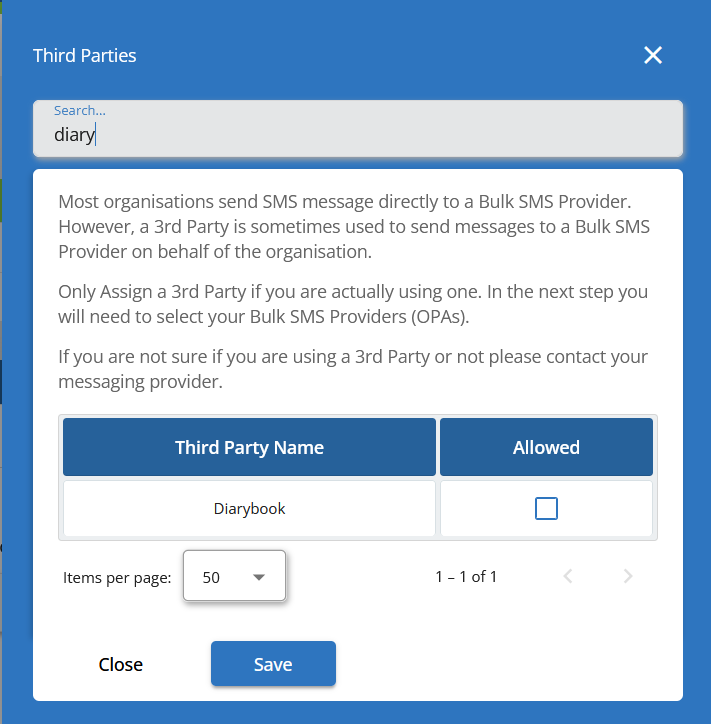
- Select the Assign 3rd Party button.
- Search for and select Diarybook.
- If you have more than one sender ID, repeat these steps for each one.
- Select Next.
Step 3: select Infobip as your OPA
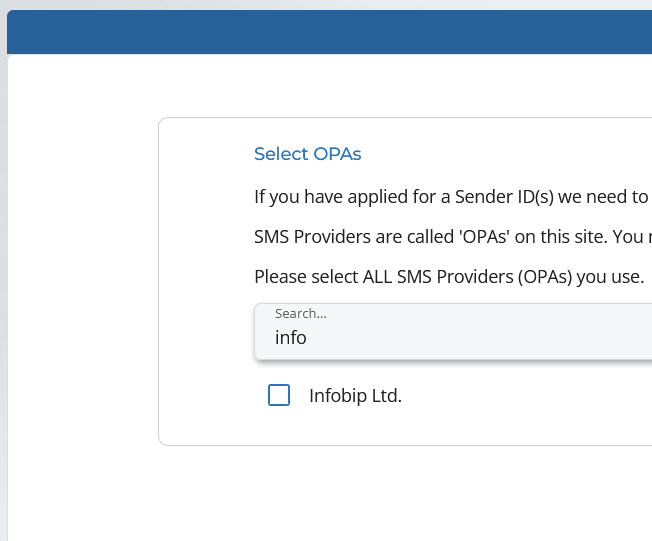
- On the Select OPAs screen, search for and select Infobip.
- Select Next.
Step 4: agree and submit
- Read and agree to ComReg’s terms and conditions.
- Submit your application.
ComReg reviews your application and tells you the outcome by email.
Once your sender ID is approved
When ComReg has approved your sender ID, let us know and we approve it on the Iflow platform. Once that’s done, you can send messages from your registered sender ID.
More information
- ComReg Sender ID Registry questions and answers: comreg.ie Registry Q&A
- For questions about the registration process itself, email ComReg directly at
senderid@comreg.ie. - For questions about using your sender ID with Iflow, contact us.